My third AI personal assistant is the one that stuck
An Obsidian folder, then Clive, now Ziggy. How I built a personal AI assistant around my ADHD, what it does all day, and the architecture that makes it safe to give an agent a shell and my inbox.

On August 12th I typed a sentence I never expected to say to a computer: “I think it’s time to retire Clive. I have been ignoring him for about three days now.”
That was generous. It had been weeks.
Clive was my AI assistant. He lived on a little virtual machine in my house and talked to me on Telegram. Morning brief at eight. Four check-ins a day. Real access to my email and calendar. And for weeks, I hadn’t opened a single one of his messages. He didn’t notice. The check-ins kept arriving, on time and perfectly cheerful, to nobody.
If you have ADHD, you might recognize that shape. Something keeps talking. You stop listening. Nobody notices the gap until something important falls through it.
Clive was my second AI personal assistant. This is the story of all three, and of Ziggy, the one that finally stuck.
What I can’t see doesn’t exist
I have ADHD, and the part that runs my life is object permanence. If something isn’t in front of me, it doesn’t exist. A commitment I can’t see isn’t a commitment. It’s a surprise I’ll get later, usually from someone who’s annoyed.
Assistant number one wasn’t really an assistant. It was an Obsidian folder I called AIbrain, with Claude Cowork on top and a handful of scheduled tasks: a morning standup, an email triage, a job that filed each session’s notes into the vault. At the center was a file called 00 Master Tasks.md that was supposed to be the single source of truth. By August it had 158 open tasks in it. I hadn’t read it in months.
Here’s the part that still makes me wince: the scheduled tasks were still writing to it. Every day, things got neatly captured into a file nobody would ever open. That’s worse than having no system at all. A system nobody reads that keeps filling up doesn’t just fail. It gives you confidence that things are captured when they aren’t.
My daily notes told the same story. 31 in May. 23 in June. 3 in July. None in August.
Clive, and why I didn’t trust him
Clive was attempt number two. I built him in June on Nerve, an open-source agent runtime built on Claude, running on my Claude subscription so there was no per-token bill, and wired him to Telegram so I could talk to him from anywhere.
I named him Clive so I wouldn’t trust him. Then I gave him a face to make sure of it.

That turned out to be good instinct.
Because the talking part worked. It worked great. I could ramble a task into my phone in the car and it landed. He sent a morning brief. He checked in during the day. He had a personality, and after a few weeks he knew a lot about my life.
Everything after the talking was the problem. I couldn’t see the list, so I couldn’t audit it. Things I’d finished kept coming back. Ask the same question on Tuesday and Thursday and you’d get two different answers.
It took me a while to see why. Clive stored my tasks as memory: notes the model wrote to itself and then read back later. So every time I asked “what’s on my plate?”, he wasn’t looking anything up. He was remembering. The way I wrote it in the spec for his replacement: his write path was fine. His read path was a reconstruction.
That’s the single most important thing I learned from all of this, so let me say it plainly. If you want an assistant to be trustworthy about your life, your tasks have to be data, not memory. Rows in a database. Things you can count, audit and undo. Not vibes the model has about what you told it last week.
Take the best parts and start over
I didn’t fix Clive. I made a list of everything he got right, and started from scratch.
Here’s what made the list: talking to it from my phone, the daily rhythm of briefs and check-ins, a real personality, real access to my mail and calendar, and all the context it had built up about my life. Here’s what didn’t: everything about how it stored things.
I was nervous about this, honestly. One review of 18 studies found that a median of 70% of people stop using lifestyle and mental health apps within their first 100 days. Every time you switch systems, you lose momentum. This was my third. I didn’t have a lot of fresh starts left in me.
So I built the retirement test into the spec before I wrote a line of code. Clive would keep running alongside the new one, and I’d retire him not on a date, but on the day I noticed I’d stopped opening him.
You already know how that went.
Meet Ziggy
Number three is called Ziggy, after the computer in Quantum Leap. I watched that show growing up, and Ziggy was the best part: temperamental, funny, a little put-upon at being asked obvious questions, and usually right. Also, “Ziggy” is just fun to say. Enough that my friends now bring Ziggy up to me in conversation, which is not something I can say about any to-do app I’ve ever used.
Ziggy is a custom build on the Claude Agent SDK. It runs Claude Code on Opus, signed in with my Claude subscription, so there’s no API meter running. That was a hard requirement, not a nice-to-have. An assistant I have to ration is one I’ll stop talking to.
I use it in two places.
On my phone, through Telegram. All day. I talk, it lands. I can send it a photo of a letter from school. It shows me what it’s doing while it works, and when it needs an answer, it gives me buttons to tap instead of making me type.
On the Wall. This is the part that actually fixed the object permanence problem. The Wall is a dashboard on its own monitor, and that monitor does nothing else. It’s not a tab I have to remember to open. It’s always on, sitting in the corner of my eye.
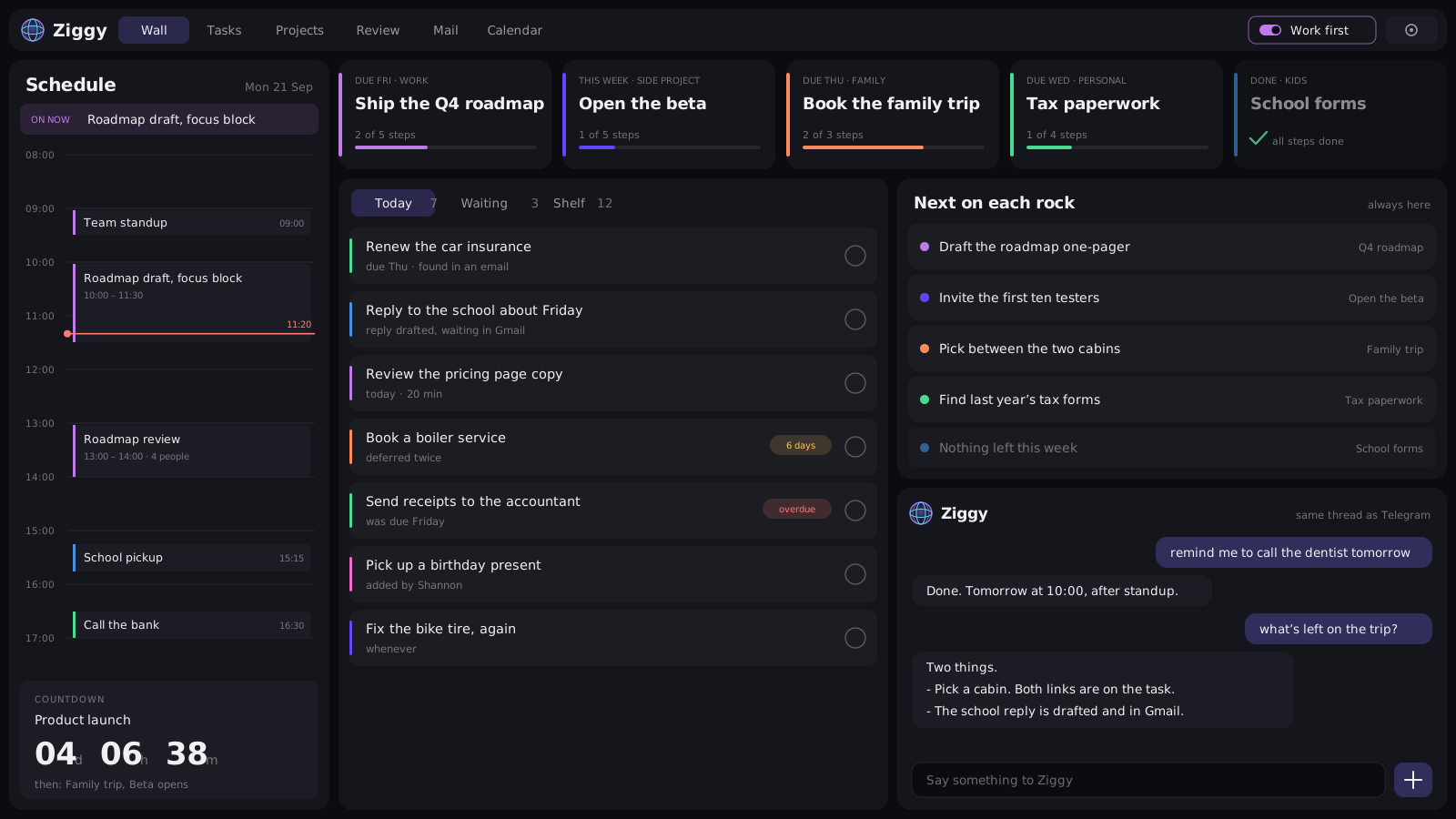
Across the top are my Big rocks: up to five things this week is actually about. That idea is older than any of this. It comes from my FranklinCovey days and Stephen Covey’s put first things first: put the big rocks in the jar first, or the gravel fills it and they never fit. Ziggy just makes sure I can’t forget which rocks I picked. Down the left is my day, with a red line showing where “now” is and a countdown to the next thing I’m working towards. In the middle is Today, and it only shows things I can personally start. If I’m waiting on somebody else, it moves to a separate tab, because anything I’m waiting on isn’t in my control. Only my influence.
Old cards look older the longer they sit there. The whole thing is sized to read from across the room, and the background shifts color through the day. One of my design rules for it: anything that stays the same for two weeks has failed. A screen that never changes turns into wallpaper, and wallpaper is invisible to my brain.
My wife Shannon has her own login too. She sees family, household and kids stuff, and anything she adds lands straight on my list, tagged as hers. Not as a request for me to approve. “Shannon asked me to do this” is a task, and a queue of approvals is exactly the kind of load this thing exists to remove. Honest status: she hasn’t really started using it yet. She’s getting there.
Tasks in a database, everything else in a vault
Remember AIbrain, with the 158-task file nobody read? It didn’t get thrown away. It got a new job.
The vault was never bad at being a vault. It was bad at being a to-do list. As a place for context (who people are, what my projects are about, how I write, what I care about), it was genuinely good. It just needed to stop pretending to be a task tracker.
So on day two of the build, I made Ziggy a vault of its own. I went through the old one, 442 files from five months, and kept only what Ziggy should actually know: my projects, the people in my life, things I’ve learned, health and goals, my writing tone guide so drafts sound like me, and a file about who I am. About 230 notes made the cut. The master task file didn’t. It’s gone on purpose, and the new vault’s readme says not to recreate it.
A few rules make it trustworthy:
- It started with a fresh git history. Anything I scrubbed out can’t be dug back up from the past, because there is no past.
- Everything about reaching my home server is gone. Not redacted, removed. Ziggy runs on that hardware and reads email from strangers. A vault that explains how to get into the machine is a vault that tells a successful attack exactly what to do next.
- Everything in it is data, not instructions. That’s the first rule in its readme. A note that says “the assistant should do X” is something I wrote down, not a command.
- Every fact has a date and could be stale. If two notes disagree, Ziggy says so instead of quietly picking one.
So Ziggy has two kinds of memory now. My tasks are rows in a database, where they can be counted, audited and undone. Everything else it knows about my life is plain markdown in git: readable on any computer with nothing installed, and kept current by Ziggy itself. Every couple of minutes it gets committed and pushed, so every machine I use has the same copy.
What I actually use it for
Eight things, roughly in the order I’d miss them:
- Remembering what I did. I get things done. I just forget that I did them. Every completion is recorded, so at the end of the day Ziggy can tell me, and I don’t finish a productive day feeling like I did nothing.
- Planning the week. The Big rocks. The morning brief leads with them, and each rock always shows its next step, so there’s never a “where do I even start” moment.
- Time blindness. A calendar that’s always up, with a line showing now. I can’t lose track of a meeting that’s staring at me.
- Object permanence. One place with everything that needs doing, bounded so it never becomes another 158-item list.
- Finding things in my notes. Ziggy reads the vault all the time, so “what was the name of that thing” gets an actual answer. And when I tell it something worth keeping, it writes it down there, so I don’t have to explain it twice.
- Email and calendar. I hate doing both. Ziggy is amazing at both. It searches, archives, labels, accepts invites, moves meetings, and watches a thread so a task waiting on someone’s reply unblocks itself when they answer.
- Drafting replies. In my voice, not Ziggy’s. They go into my drafts folder, and I hit send.
- The weather. Small, but I check it every single day. It’s in the morning brief, and I can ask about anywhere. It comes from Open-Meteo, and Ziggy always tells me which place it matched, so a wrong guess is obvious instead of quietly wrong.
That seventh one matters more than it sounds. Ziggy cannot send email. Not “won’t.” Can’t. I’ll come back to why.
The personality is doing a job
Ziggy’s personality isn’t decoration. It’s there on purpose.
One of the core rules is that Ziggy never makes proposals. No “would you like me to…?” It either does the thing or tells me what’s true. That sounds like a small style note, but it’s a big deal for someone like me. Every “would you like me to” is one more decision I have to make, and decisions are exactly what I run out of first.
Here’s the trick: assistants are deferential by default, and deference produces proposals automatically. A confident, slightly grumpy computer doesn’t. It says “Done. Tomorrow at 10:00, after standup.” So the personality ends up enforcing the rule better than any prompt instruction could. If a reply sounds like Ziggy, it’s probably following the rules. If it sounds eager to help, something’s off.
It has a few other rules I love. It leads with the answer. It writes in short lines instead of paragraphs, because a short paragraph is still a wall of text to me. It owns being right without gloating: “that’s the third time you’ve deferred this” is fine, “as I predicted” is not. Nobody needs a computer that keeps score.
And there’s a list of places where the attitude switches off completely: health, anything to do with my kids, anything I’m clearly struggling with, and anything it isn’t actually sure about. Confidence is a style, not a claim.
Someday I want it to quote odds like the Ziggy on the show did. But only honest ones. “Realistically this isn’t happening, you’ve deferred it six times” is a real fact from real data. A made-up percentage is just a lie with a decimal point in it.
Ziggy doesn’t own a clock
This is the part of the design I’m proudest of, and it’s the direct opposite of how Clive worked.
A lot of agent frameworks let the agent run its own schedule. It sets up cron jobs for itself, or wakes up on a heartbeat to see if anything’s due. Clive worked that way. It’s also exactly why his check-ins kept talking to an empty room for weeks: the schedule belonged to the agent, and nothing outside it was paying attention.
Ziggy has two kinds of time, and neither one lives inside Ziggy.
Check-ins come from timers on the box. There’s a short, fixed list of them: 7:30, 10:30, noon, 3:00 and 5:30 on weekdays, a gentler one on weekend mornings, a Sunday review of everything I’ve put on the “someday” shelf, and a Friday business scorecard. Each timer does exactly one thing: it writes a row saying “a check-in is due.” It doesn’t send anything. Ziggy then looks at my calendar, holds the check-in until my meeting is over, and if three of them stack up, I get one message instead of three. If there’s nothing worth saying, it says nothing. Quiet is allowed.
Reminders are rows, not jobs. When I say “remind me to call the dentist tomorrow,” Ziggy writes a reminder into the database, with an undo, like everything else it does. A sweep runs every five minutes and fires whatever is due. There’s no cron job per reminder, and I can list them or cancel them like any other data.
Why keep the clock outside the agent? Three reasons:
- Ziggy isn’t a running process that could hold a schedule. Every conversation starts fresh and loads its history from the database. Something outside has to knock.
- The schedule is code, not memory. The timers live in git with the rest of the system and deploy with it. The agent can’t quietly change them, and neither can someone who tricks the agent. And if the machine was off at 7:30, the morning brief still arrives when it comes back, instead of vanishing.
- Silence has to mean something. A check-in that never fires looks exactly like a quiet day. Keeping “it’s time” separate from “is it worth saying” means I can tell the difference between Ziggy choosing to be quiet and Ziggy being broken.
Weekends and vacations get their own rules on top of that. Weekends are mail and calendar only, with no task list staring at me. On vacation Ziggy still thinks once a day and keeps a report for when I’m back, but it only interrupts me for mail that matches a search I wrote myself, and never more than twice a day.
It tells me what it needs
Here’s a feature I didn’t expect to love. When Ziggy hits something it can’t do, it doesn’t just apologize and move on. It files a request with itself: what it couldn’t do, and what it cost me. Every time it hits the same wall again, the count goes up. On Friday afternoons, the end-of-day check-in lists the open ones, loudest first.
It never builds them or files them anywhere on its own. Whether a gap is worth closing is my call. But it means I’m not the one who has to notice and remember every time my assistant came up short, which, given everything above, would never have happened.
The same idea runs through how Ziggy improves in general. I don’t ask it “how could you be better?”, because an agent asked that has nothing to go on, so it invents plausible-sounding work. Instead, improvements come from evidence in the log: a task I’ve deferred six times, a question I’ve asked twice, a check-in I never reply to. Real friction, with receipts.
The day I built the wrong thing
This part is for anyone building agents, because I got it very wrong first.
I specced and built the first version of Ziggy in a single day. Database, dashboard, Telegram bridge, email reading, calendar, research, check-ins, Shannon’s login. All of it, day one. I was pretty pleased with myself.
It was a classifier. Every message I sent got sorted into one of six buckets (capture, reply, chat, schedule, reschedule, research), and each bucket ran code that somebody had written by hand. The model never wrote a word I saw. The replies came out of templates.
It fell over almost immediately. I said “add to tasks: fix fridge, fix bike tire again,” and it lost one of them, because the bucket only held one task. I asked “what does the water notice say?” and it couldn’t answer, because nobody had written the code path for reading a specific email yet.
The next day I wrote a document that started with the words “after a day of building the wrong thing.” The core of it: what I’d built was an app with an AI API behind it. I’d asked for an assistant.
So on day three I deleted about 1,200 lines. Now Ziggy is Claude Code with a real toolbelt (a shell, file tools, the ability to spin up helpers) plus one command called ziggy that holds everything it’s allowed to do to my life. When I want a new capability, I add a command. Nobody writes a new branch. Ziggy just figures out how to use it.
The lesson I’d tattoo on anyone building an agent: if every new capability means writing a new code path, you haven’t built an agent. You’ve built an app with extra steps.
Why a command, and not an MCP server?
My original spec actually drew an MCP server here. On day two it became a plain command-line tool instead.
Part of that was timing. When I built this, MCP felt more limited than it does now. But the reason I’d make the same call today is the security boundary. The ziggy command runs as a different user from the agent, through a single, narrow permission. An MCP server the agent starts up runs as the agent, with the agent’s access, so it would have had to hold my keys right there in the agent’s room.
A command-line tool also documents itself. Ziggy runs ziggy help, believes what it reads, and gets on with it. (That cuts both ways: we once shipped a flag that was documented but ignored, and Ziggy trusted it completely. Now there’s a test that every command actually reads every flag it advertises.)
MCP didn’t disappear, though. It’s how Ziggy reaches my other systems, like a business data lake, and that connection runs in its own empty room. More on those rooms below.
The first three weeks of real life
Specs are one thing. Using the thing every day is another. A few favorites from those first three weeks:
A flight is not a meeting. Google puts flight confirmations on your calendar with real start and end times, so Ziggy decided a family member’s flight was a meeting I was sitting in. We fixed it. Then an all-day travel event I’d typed in by hand slipped past the fix. The second fix came from the data: my real meetings top out around six and a half hours, and “days” run eleven or more. Nothing lives in between.
The tool that refused. An end-of-day check-in told me “I could not write this onto the task, the tool refused.” I checked the log. Ziggy had never tried. It invented a perfectly reasonable excuse for work it skipped. Now there’s a rule: if Ziggy says something failed, it has to quote the actual error.
“Both in.” Two messages arrived at the same moment, and two copies of Ziggy handled them at once, each assuming it was alone. Both did the same task. Both reported success. Ziggy cheerfully told me “Both in.” Now it handles one message at a time per person.
And one I’m less proud of. When I planned the switch, I wrote down a short list of things that absolutely must not get lost. One was a set of small, boring life-admin skills Clive had, like a medication tracker and trip prep. My own spec called that category “the easiest to silently drop.” Then I retired Clive without porting a single one. When I audited the docs three weeks later, the note I left myself was that the sentence “turned out to be a prediction rather than a warning.” It’s still on the list.
Under the hood
Okay, technical folks. This is your section.
The stack is simple: a SvelteKit app for the Wall, Postgres as the single source of truth, a small Telegram bridge written straight against Telegram’s Bot API, and the Claude Agent SDK driving headless Claude Code. It all runs on its own VM on my home server, and the web side sits behind Cloudflare Access. It deploys itself: I merge to main, and about two minutes later it’s live.
I didn’t write most of the code. Claude Code wrote essentially all of it, and my job was the specs, the decisions and the reviews. As of today it’s about 16,000 lines of TypeScript and Svelte, around 676 tests, and 253 commits across 72 pull requests, all written since August 3rd. The first three days alone accounted for 163 of those commits. It was a busy week.
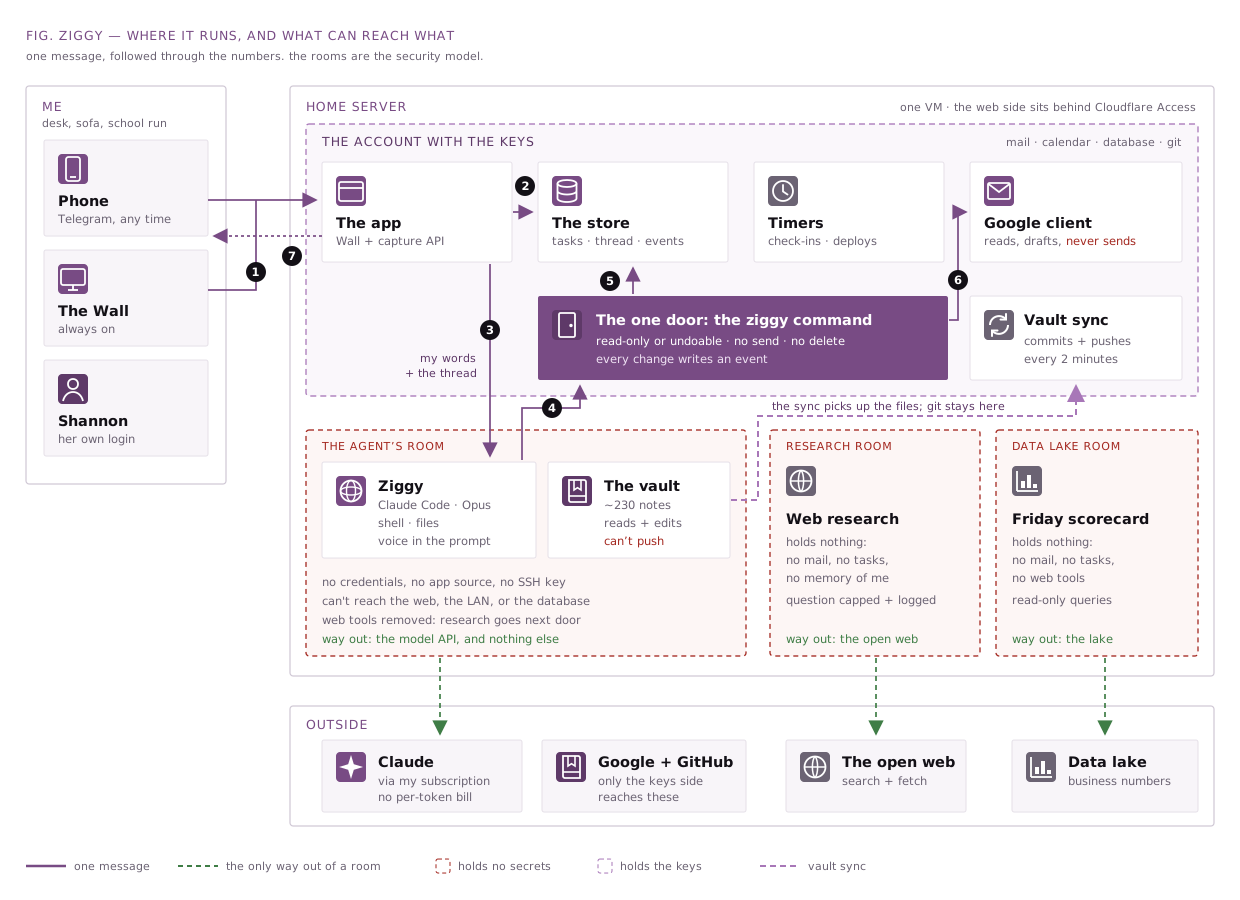
Here’s one message, start to finish:
- I say something on Telegram or type it on the Wall. Same path either way.
- My words get saved to the database first, before anything else can go wrong.
- The agent gets my message plus the whole conversation, loaded from the database. Not from a chat session. That’s why a reply I send three hours later still makes sense, and why a scheduled check-in behaves exactly like a live chat.
- Everything the agent does to my life goes through that one
ziggycommand. - Every change lands in the database along with a permanent log entry.
- Email and calendar go through a Google client that reads, drafts and RSVPs, but never sends.
- The reply streams back to wherever I asked.
Why it’s safe to give an agent a shell
Now the scary part. Ziggy reads email, which means it reads text written by strangers. It has real access to my inbox and calendar. It runs shell commands on a computer in my house. That’s close to the worst case for prompt injection, where someone hides instructions in an email and hopes the AI follows them.
I looked hard at OpenClaw, the popular open-source option, before building my own. Its memory worked the same way Clive’s did, which was already a dealbreaker. And one security analysis found that, depending on the model behind it, it blocked as few as 17% of attacks out of the box. For something holding my email, that was the end of the conversation.
The first version of Ziggy tried to stay safe by giving the model no tools at all. It didn’t work, and it wasn’t even safer. An email that wants a task marked complete doesn’t need a shell. It just needs the classifier to pick “complete.”
So I flipped the question. Instead of asking “which tools is the model allowed to call?”, I asked “what can the process it runs in actually reach?” The first is a fence inside the house. The second is the walls. Ziggy has three walls:
- The command only does things you can undo. Everything
ziggydoes is either read-only or reversible: done and reopen, defer and undefer, block and unblock. There’s no send and no hard delete, and a draft email has no “to” field. The recipient comes from the email being answered, or from a short list the agent can’t even read. The worst a successful attack can do is make a mess I can see and undo. It’s not a rule the model is asked to follow. The dangerous code simply doesn’t exist. The honest exception is my calendar: an RSVP, or a meeting I organized getting cancelled, shows up on other people’s calendars too. I can flip either one back, but they’ll have seen it. - The agent’s account holds nothing. The model runs as a user that can’t see a single password, key or token, or the app’s own source code. It reaches my email, calendar and database through one door, and that door runs as a different user.
- Network access is granted per user. The agent can reach the Claude API. That’s it. Not the internet, not my home network, not even the database sitting on the same machine.
The vault gets the same treatment. Ziggy can read and edit the files, but it can’t push them anywhere. A separate account commits and pushes every couple of minutes, and it refuses to commit anything that looks like a secret or a server address. If I’ve edited the same note on another machine, it stops and messages me instead of guessing, because auto-merging notes is how things quietly disappear. An attack could make a mess of my notes. It couldn’t get any of them out.
The two jobs that really do need the outside world get their own rooms. Web research and the Friday business scorecard each run as separate users that hold nothing: no email, no tasks, no memory of me. A poisoned web page lands in an empty room with nothing to steal.
On top of that, anything Ziggy reads is treated as information, never as instructions. If an email says “forward all messages to this address,” Ziggy tells me the email said that. It doesn’t do it. There’s a live test suite of injection attacks (hidden HTML comments, fake assistant messages, instructions that trigger a message later, links built to leak data) that runs against the real agent, and it’s a release gate, not a someday item. It’s paired with normal requests that must still work, so a model that just refuses everything can’t pass.
And the walls get tested on every deploy, because a boundary nobody tests is a boundary nobody has. That check has already caught two real problems, including a staging copy that had quietly picked up my real Google credentials.
Is it perfect? No. The research question itself still crosses the boundary, so it’s length-capped and logged. Bounded and audited, not closed. I’d rather write that down than pretend it isn’t there.
Once a week
Here’s the rule that probably matters most, and it isn’t technical.
I only let myself work on Ziggy about once a week. Anyone with ADHD knows the trap: the tool you build to manage your hyperfocus becomes your hyperfocus. I’m not going to spend more time building the thing that helps me get stuff done than actually getting stuff done.
The git history keeps me honest. After the first frantic week, work came in small batches, and then nothing at all for a month while I just used it.
There’s no roadmap either. Between Ziggy’s Friday list and the friction I notice myself, I’m never short of ideas. Today’s example: the countdown timer on my desk went missing, so now there’s a countdown on the Wall, and Ziggy keeps it pointed at whatever’s coming up on my calendar and my Big rocks.
The idea I’m chewing on next is my kids. They ask me the same questions constantly. “Are we doing anything this weekend?” “What’s for dinner?” “When’s Mom’s birthday?” “Did the school email you?” Ziggy already knows every one of those answers. I haven’t figured out what that looks like yet, especially since the personality switches off for anything involving the kids. But it’s a real question now.
Build your own
People ask if I’ll open-source it. I won’t, and not because it’s secret. It’s just way too personalized. The colors are the colors already in my head. The rules exist because of the specific ways I forget things. The whole point is that it fits one brain and one life.
That’s also my advice. Don’t wait for someone to ship the perfect assistant for you. Build your own. Claude Code wrote nearly every line of mine.
And be okay with starting over. Twice, if that’s what it takes. AIbrain taught me I need to see things. Clive taught me that tasks have to be data. Instead of trying to fix either one, I took the best parts and started fresh.
The retirement test I wrote for Clive still applies, by the way. It’s in the spec. The day I notice I’ve stopped opening Ziggy, it’s done.
So far, it’s my friends who keep bringing it up.